knitr::opts_chunk$set(echo =TRUE)library(future)library(furrr)# load in helper functionsfor (fname inlist.files(here::here("R"), pattern ="*.R")) {source(here::here(file.path("R", fname)))}# helper variablesDATA_PATH <- here::here("data")n <-10# do leave-one-out for first 10 samples for illustration
Show Code
import syssys.path.append("..")import osfrom os.path import join as ojimport pandas as pdimport numpy as npimport timefrom joblib import Parallel, delayedimport inspectsys.path.append('..') # add parent directory to pathfrom python.load import load_brca_data, load_subtype_datafrom python.clean import apply_log_transformfrom python.fit import fit_rf_loo# Helper variablesDATA_PATH = oj("..", "data")n =10# Do leave-one-out for the first 10 samples for illustration
Load Data
In this parallelization example, we will be working with gene expression data from women with breast cancer from The Cancer Genome Atlas (TCGA) (and also used in lab 2). In particular, we will be using the gene expressions to predict their breast cancer subtype (Luminal A, Luminal B, Basal, Her2, Normal-like). Let’s first load in this data.
# Load in TCGA breast cancer dataX = load_brca_data(DATA_PATH).values # convert to numpy arrayX = apply_log_transform(X)y = load_subtype_data(DATA_PATH)['subtype'].values # convert to numpy array
For the sake of this demonstration, suppose that we want to evaluate the performance of a random forest model on this data using leave-one-out cross-validation (also known as the jackknife in statistics). The jackknife is a useful technique for estimating the bias and variance of a statistical model/estimator and can also be used to identify influential observations (i.e., those observations that have a large impact on the model’s performance).
To do so, there is a helper function fit_rf_loo() in R/fit.R or python/fit.py that takes in the covariate data X, the response variable y, and the index of the observation to leave out i. This function fit_rf_loo() fits a random forest model on the data with the i-th observation left out and returns the predicted class of the left-out i-th observation.
function (i, x, y, ...)
{
fit <- ranger::ranger(x = x[-i, , drop = FALSE], y = y[-i],
num.threads = 1, ...)
preds <- as.character(predict(fit, x[i, , drop = FALSE])$predictions)
return(preds)
}
Show Code
print(inspect.getsource(fit_rf_loo))
def fit_rf_loo(i, x, y, **kwargs):
"""
Fit a random forest model with sample `i` left out
Parameters:
-----------
i: int
The sample to leave out
x: np.array
Covariate matrix
y: np.array
Response vector
**kwargs:
Arbitrary keyword arguments for RandomForestClassifier
Returns:
--------
str
Predicted class of the left out sample `i`
"""
# Remove the ith observation for leave-one-out
x_train = np.delete(x, i, axis=0)
y_train = np.delete(y, i)
# Train the RandomForestClassifier
rf = RandomForestClassifier(**kwargs)
rf.fit(x_train, y_train)
# Make a prediction on the left-out observation
preds = rf.predict(x[i:(i+1), :])[0]
return preds
Without Parallelization
Let’s first run the leave-one-out cross-validation without parallelization to see how long it takes. We will only run this on the first n = 10 observations for demonstration purposes.
start_time = time.time()preds = np.empty(n, dtype=object) # Vector of leave-one-out predictionsfor i inrange(n): preds[i] = fit_rf_loo(i, X, y)end_time = time.time()execution_time = end_time - start_timeprint("Execution time without parallelization:", execution_time)
Execution time without parallelization: 21.470791816711426
With Parallelization
Next, let’s run the leave-one-out cross-validation with parallelization using the future library in R and the joblib library in Python. But before implementing this, let’s check how many cores are available on this machine using future::availableCores() in R and os.cpu_count() in Python.
Now, to parallelize this code, there are two steps:
Step 1: Setting up the parallel backend.
In R: This is done using the future::plan() function, which specifies the parallel backend to use. Here, we will use the multisession backend, which creates multiple (independent) background R sessions to parallelize the computation.
In Python: This is done using Parallel(n_jobs=...), where we specify the number of cores we would like to use.
Step 2: Re-write the code using futures (or delayed()) A future is an object that represents the result of an expression that will be evaluated in the future.
In R: We can create a future using the future::future() function and extract the value of the future using the future::value() function.
In Python: We need to put the code that we want to run in parallel into a single function (luckily, this is already done) and wrap that function call using delayed(). This creates futures that can be evaluated in parallel.
set.seed(242)# step 1: set up parallel backendn_workers <-5plan(multisession, workers = n_workers)start_time <-Sys.time()futures <-list()for (i in1:n) {# step 2: wrap code in a "future" object futures[[i]] <-future({fit_rf_loo(i, X, y) }, seed =TRUE)# (optional) checking whether the future we created has been resolved or unresolvedprint(resolved(futures))print(paste("Intermediary Time Checkpoint:", Sys.time() - start_time))}preds_future <-lapply(futures, value)end_time <-Sys.time()execution_time <- end_time - start_timeprint(paste("Final Time Checkpoint:", execution_time))
[1] FALSE
[1] "Intermediary Time Checkpoint: 0.100641012191772"
[1] FALSE FALSE
[1] "Intermediary Time Checkpoint: 0.214888095855713"
[1] FALSE FALSE FALSE
[1] "Intermediary Time Checkpoint: 0.32613205909729"
[1] FALSE FALSE FALSE FALSE
[1] "Intermediary Time Checkpoint: 0.454898118972778"
[1] FALSE FALSE FALSE FALSE FALSE
[1] "Intermediary Time Checkpoint: 0.710055112838745"
[1] TRUE FALSE FALSE FALSE FALSE FALSE
[1] "Intermediary Time Checkpoint: 5.57519102096558"
[1] TRUE TRUE TRUE FALSE FALSE FALSE FALSE
[1] "Intermediary Time Checkpoint: 5.72342705726624"
[1] TRUE TRUE TRUE TRUE FALSE FALSE FALSE FALSE
[1] "Intermediary Time Checkpoint: 5.85366606712341"
[1] TRUE TRUE TRUE TRUE FALSE FALSE FALSE FALSE FALSE
[1] "Intermediary Time Checkpoint: 6.01137018203735"
[1] TRUE TRUE TRUE TRUE TRUE FALSE FALSE FALSE FALSE FALSE
[1] "Intermediary Time Checkpoint: 6.16991114616394"
[1] "Final Time Checkpoint: 10.9680399894714"
Show Code
start_time = time.time()preds_parallel = Parallel(n_jobs=5)(delayed(fit_rf_loo)(i, X, y) for i inrange(n))end_time = time.time()execution_time = end_time - start_timeprint("Execution time with joblib parallelization:", execution_time)
Execution time with joblib parallelization: 7.436609983444214
Note:
The futures are “non-blocking” so that the code continues to run (while the futures are being computed in the background) until it reaches a point where the value of the future is needed. This is why the print statement shows that the futures are at first unresolved and there is a time gap between the intermediary checkpoint and the final checkpoint.
A future can be resolved or unresolved. In R, we can check whether a future is resolved using the future::resolved() function.
If the value is queried while the future is still unresolved, the current process is blocked until the future is resolved. Otherwise, the code continues to execute (i.e., it’s unblocking).
The futures are resolved when the value() function is called, and the code waits for the future to be resolved before continuing.
Additional Notes for R Users
Using furrr
Sometimes, it can be more convenient to rewrite the for loop using the furrr package, which provides a functional programming interface for parallel programming in R. The furrr::future_map() function is similar to the purrr::map() function, but it runs the function in parallel using futures.
Show Code
set.seed(242)# step 1: set up parallel backendplan(multisession, workers = n_workers)start_time <-Sys.time()# step 2: wrap code in a "future" objectpreds_furrr <- furrr::future_map(1:n,function(i) {fit_rf_loo(i, X, y) },.options = furrr::furrr_options(seed =TRUE))end_time <-Sys.time()execution_time <- end_time - start_timeprint(execution_time)
Time difference of 10.5588 secs
Parallelization backends
In short, use multisession if running R locally in RStudio, and use multicore for simple parallelization workflows on the CRC.
---title: "Parallelization Example"author: "Prof. Tiffany Tang"date: todayformat: html: code-fold: show code-summary: "Show Code" code-tools: true theme: sandstone lightbox: true embed-resources: truetoc: trueexecute: warning: false message: false---:::{.panel-tabset}### R```{r}knitr::opts_chunk$set(echo =TRUE)library(future)library(furrr)# load in helper functionsfor (fname inlist.files(here::here("R"), pattern ="*.R")) {source(here::here(file.path("R", fname)))}# helper variablesDATA_PATH <- here::here("data")n <-10# do leave-one-out for first 10 samples for illustration```### Python```{python}import syssys.path.append("..")import osfrom os.path import join as ojimport pandas as pdimport numpy as npimport timefrom joblib import Parallel, delayedimport inspectsys.path.append('..') # add parent directory to pathfrom python.load import load_brca_data, load_subtype_datafrom python.clean import apply_log_transformfrom python.fit import fit_rf_loo# Helper variablesDATA_PATH = oj("..", "data")n =10# Do leave-one-out for the first 10 samples for illustration```:::## Load DataIn this parallelization example, we will be working with gene expression data from women with breast cancer from [The Cancer Genome Atlas (TCGA)](https://www.cancer.gov/ccg/research/genome-sequencing/tcga) (and also used in lab 2). In particular, we will be using the gene expressions to predict their breast cancer subtype (Luminal A, Luminal B, Basal, Her2, Normal-like). Let's first load in this data.:::{.panel-tabset}### R```{r load-data}# load in TCGA breast cancer dataX <- load_brca_data(DATA_PATH) |> apply_log_transform()y <- as.factor(load_subtype_data(DATA_PATH)$subtype)``````{r}head(X[, 1:5])``````{r}head(y)```### Python```{python}# Load in TCGA breast cancer dataX = load_brca_data(DATA_PATH).values # convert to numpy arrayX = apply_log_transform(X)y = load_subtype_data(DATA_PATH)['subtype'].values # convert to numpy array``````{python}X``````{python}y```:::## Fitting leave-one-out modelsFor the sake of this demonstration, suppose that we want to evaluate the performance of a random forest model on this data using leave-one-out cross-validation (also known as the *jackknife* in statistics). The jackknife is a useful technique for estimating the bias and variance of a statistical model/estimator and can also be used to identify influential observations (i.e., those observations that have a large impact on the model's performance).To do so, there is a helper function `fit_rf_loo()` in `R/fit.R` or `python/fit.py` that takes in the covariate data `X`, the response variable `y`, and the index of the observation to leave out `i`. This function `fit_rf_loo()` fits a random forest model on the data with the `i`-th observation left out and returns the predicted class of the left-out `i`-th observation.:::{.panel-tabset}### R```{r}fit_rf_loo```### Python```{python}print(inspect.getsource(fit_rf_loo))```:::## Without ParallelizationLet's first run the leave-one-out cross-validation without parallelization to see how long it takes. We will only run this on the first `n = 10` observations for demonstration purposes.:::{.panel-tabset}### R```{r}set.seed(242)start_time <-Sys.time()preds <-rep(NA, n) # vector of leave-one-out predictionsfor (i in1:n) { preds[i] <-fit_rf_loo(i, X, y)}end_time <-Sys.time()execution_time <- end_time - start_timeprint(execution_time)```### Python```{python}start_time = time.time()preds = np.empty(n, dtype=object) # Vector of leave-one-out predictionsfor i inrange(n): preds[i] = fit_rf_loo(i, X, y)end_time = time.time()execution_time = end_time - start_timeprint("Execution time without parallelization:", execution_time)```:::## With ParallelizationNext, let's run the leave-one-out cross-validation with parallelization using the `future` library in R and the `joblib` library in Python. But before implementing this, let's check how many cores are available on this machine using `future::availableCores()` in R and `os.cpu_count()` in Python.:::{.panel-tabset}### R```{r}availableCores()```### Python```{python}os.cpu_count()```:::Now, to parallelize this code, there are two steps:**Step 1: Setting up the parallel backend.** - In R: This is done using the `future::plan()` function, which specifies the parallel backend to use. Here, we will use the multisession backend, which creates multiple (independent) background R sessions to parallelize the computation.- In Python: This is done using `Parallel(n_jobs=...)`, where we specify the number of cores we would like to use.**Step 2: Re-write the code using futures (or `delayed()`)** A future is an object that represents the result of an expression that will be evaluated in the future. - In R: We can create a future using the `future::future()` function and extract the value of the future using the `future::value()` function.- In Python: We need to put the code that we want to run in parallel into a single function (luckily, this is already done) and wrap that function call using `delayed()`. This creates futures that can be evaluated in parallel.:::{.panel-tabset}### R```{r}#| results: holdset.seed(242)# step 1: set up parallel backendn_workers <-5plan(multisession, workers = n_workers)start_time <-Sys.time()futures <-list()for (i in1:n) {# step 2: wrap code in a "future" object futures[[i]] <-future({fit_rf_loo(i, X, y) }, seed =TRUE)# (optional) checking whether the future we created has been resolved or unresolvedprint(resolved(futures))print(paste("Intermediary Time Checkpoint:", Sys.time() - start_time))}preds_future <-lapply(futures, value)end_time <-Sys.time()execution_time <- end_time - start_timeprint(paste("Final Time Checkpoint:", execution_time))```### Python```{python}start_time = time.time()preds_parallel = Parallel(n_jobs=5)(delayed(fit_rf_loo)(i, X, y) for i inrange(n))end_time = time.time()execution_time = end_time - start_timeprint("Execution time with joblib parallelization:", execution_time)```:::Note:- The futures are **"non-blocking"** so that the code continues to run (while the futures are being computed in the background) until it reaches a point where the value of the future is needed. This is why the print statement shows that the futures are at first unresolved and there is a time gap between the intermediary checkpoint and the final checkpoint.- A future can be resolved or unresolved. In R, we can check whether a future is resolved using the `future::resolved()` function.- If the value is queried while the future is still unresolved, the current process is blocked until the future is resolved. Otherwise, the code continues to execute (i.e., it's unblocking).- The futures are resolved when the `value()` function is called, and the code waits for the future to be resolved before continuing.## Additional Notes for R Users### Using `furrr` {.unnumbered}Sometimes, it can be more convenient to rewrite the for loop using the `furrr` package, which provides a functional programming interface for parallel programming in R. The `furrr::future_map()` function is similar to the `purrr::map()` function, but it runs the function in parallel using futures.```{r}set.seed(242)# step 1: set up parallel backendplan(multisession, workers = n_workers)start_time <-Sys.time()# step 2: wrap code in a "future" objectpreds_furrr <- furrr::future_map(1:n,function(i) {fit_rf_loo(i, X, y) },.options = furrr::furrr_options(seed =TRUE))end_time <-Sys.time()execution_time <- end_time - start_timeprint(execution_time)```### Parallelization backends {.unnumbered}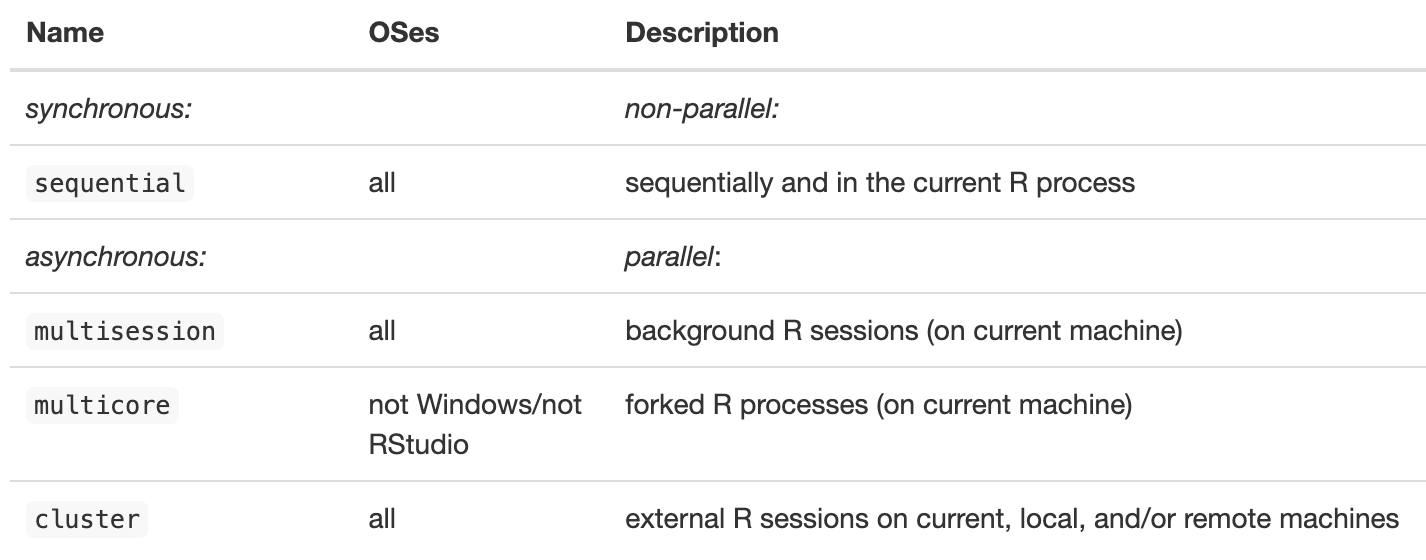In short, use `multisession` if running R locally in RStudio, and use `multicore` for simple parallelization workflows on the CRC.## Additional Resources/Links:::{.panel-tabset}### R- **future: <https://future.futureverse.org/articles/future-1-overview.html>**- **furrr: <https://furrr.futureverse.org/>** - Offers drop-in replacements for parallelizing purrr::map() functions- **future.apply: <https://future.apply.futureverse.org/>** - Offers drop-in replacements for parallelizing base R apply() functions- **doFuture: <https://dofuture.futureverse.org/>** - The "futureverse" version of the doParallel R packageStay up-to-date with the latest developments in the futureverse:\<https://www.futureverse.org/blog.html>### Python- **joblib**: <https://joblib.readthedocs.io/en/stable/>- **multiprocessing**: <https://docs.python.org/3/library/multiprocessing.html>- **Dask**: <https://www.dask.org/> - Great for handling large datasets and scaling operations from a single machine to a cluster- **Ray**: <https://www.ray.io/> - Useful for building distributed applications and handling complex parallel tasks across multiple machines- A great introductory tutorial covering joblib, multiprocessing, and Dask from Thomas Langford (Yale): <https://docs.ycrc.yale.edu/parallel_python/#/>:::
